
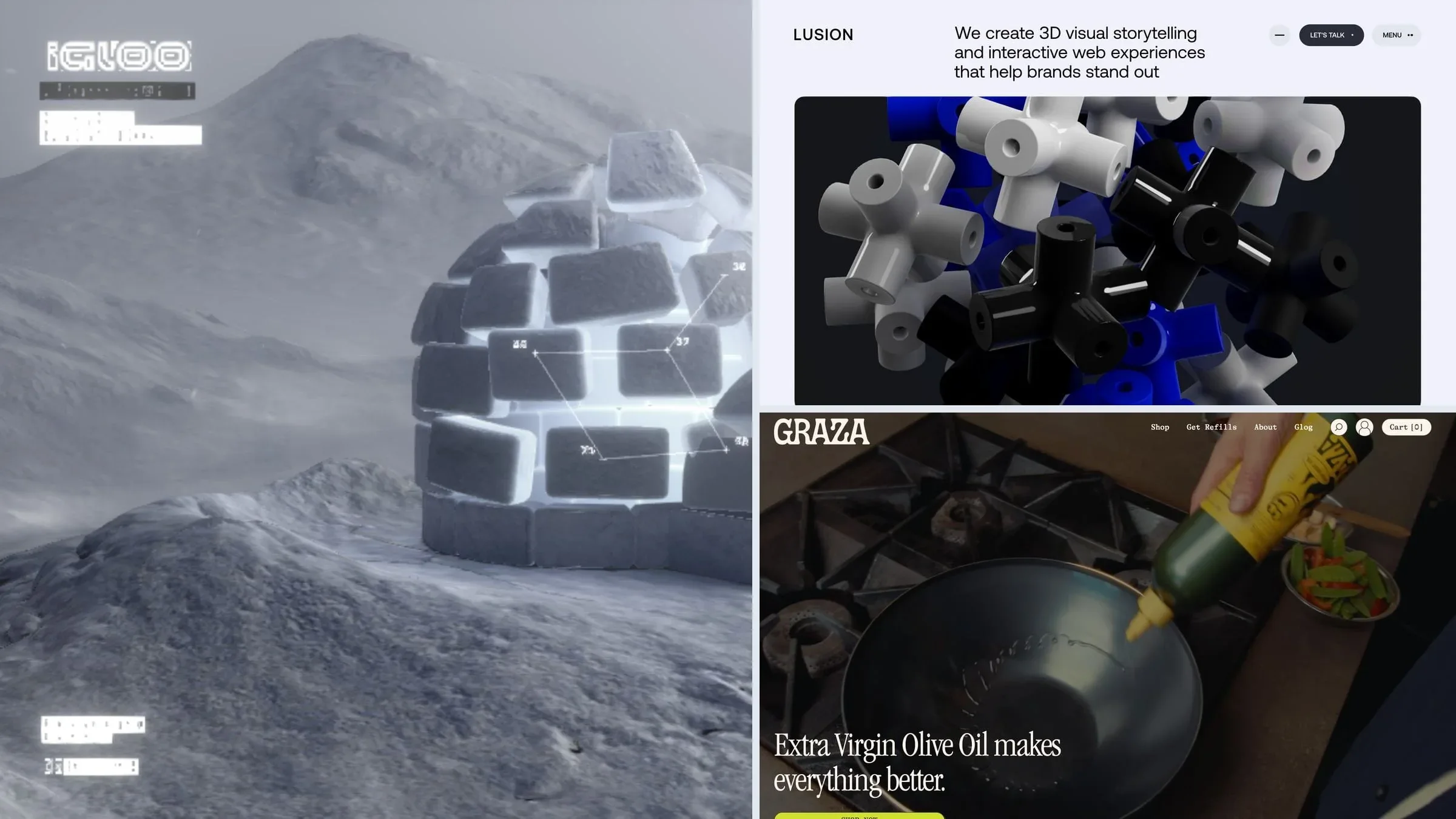
A great website does more than display information. It guides attention, communicates personality, and turns an ordinary browsing experience into something memorable.
Animation plays an important role in making this happen. A product can rotate as visitors scroll, a headline can reveal itself word by word, or an entire website can feel like an interactive world rather than a collection of static pages.
In 2026, animated websites are becoming increasingly sophisticated. Designers and developers are combining scroll-driven storytelling, real-time 3D graphics, interactive illustrations, cinematic video, and subtle micro-interactions to create distinctive digital experiences.
However, impressive animation alone does not make a website successful. The best experiences balance visual creativity with usability, accessibility, loading speed, and clear communication.
In this guide, we will explore 24 animated website examples, examine the technologies behind different animation styles, and explain what designers and developers can learn from them.
Whether you are designing a portfolio, building a SaaS website, creating an e-commerce experience, or planning a complete brand redesign, these examples offer practical inspiration.
What Makes an Animated Website Stand Out?
Before exploring individual examples, it helps to understand the different ways animation can improve a website.
Scroll-driven storytelling: Elements change position, scale, or appearance as visitors move through a page. This approach works particularly well for product demonstrations and long-form brand stories.
Interactive 3D experiences: Three-dimensional objects respond to scrolling, pointer movement, or user input. They can make abstract concepts easier to understand and give a website a distinctive visual identity.
Micro-interactions: Buttons, navigation items, icons, and form controls respond to user actions. These small details make interfaces feel more responsive.
Animated typography: Headlines appear through letter reveals, staggered transitions, masking, or carefully timed movement. Typography becomes an active part of the visual experience.
Cinematic transitions: Images, colours, shapes, and page layouts transition smoothly between sections or pages, helping the experience feel connected.
The key is to choose motion that supports the website's purpose rather than adding animation simply because a particular effect looks impressive.
24 Animated Website Examples Worth Exploring in 2026
The following examples cover a range of creative directions, from immersive 3D portfolios to product-focused brand websites. Their technical implementations may evolve over time, so treat the technology notes as a starting point for further investigation rather than a permanent specification.
1. Lusion: Interactive 3D as a Brand Identity
Explore: https://lusion.co/
Lusion demonstrates how a website can communicate a creative studio's expertise through its opening screen. Instead of relying entirely on conventional portfolio cards, the experience uses visually striking 3D graphics to establish its identity.
The result is an immersive introduction that immediately communicates a focus on digital experiences and visual experimentation.
Technology to explore: Three.js, WebGL, and animated typography.
What designers can learn: When a studio sells interactive experiences, its website can become a demonstration of its capabilities. A carefully designed 3D scene can communicate more about the studio's approach than a generic collection of images.
2. Apple AirPods Pro: Scroll-Driven Product Storytelling
Explore: https://www.apple.com/airpods-pro/
Apple's product pages are useful references for presenting complex products through a carefully controlled visual sequence.
Large product imagery, cinematic visuals, and scroll-linked transitions help visitors understand the product's design and features without requiring them to read long technical explanations first.
The approach is particularly effective when the physical product itself is central to the story.
Technology to explore: Custom JavaScript, scroll-linked animation, video, and WebGL where appropriate.
What designers can learn: Reveal product information in a deliberate sequence. Each scroll position should introduce a meaningful detail, explain a feature, or strengthen the product's value proposition.
3. Igloo Inc.: Building a Digital World
Explore: https://igloo.inc/
Igloo Inc. demonstrates an imaginative approach to brand storytelling through a distinctive three-dimensional environment.
Rather than treating the website as a collection of unrelated sections, the visual experience creates a world that connects the brand with its portfolio and projects.
This type of presentation can make a company feel like a coherent digital universe.
Technology to explore: Three.js, WebGL, and GSAP.
What designers can learn: A consistent visual environment can connect different parts of a brand. However, important navigation, headings, and supporting information should remain accessible outside the 3D canvas.
4. darkroom.engineering: Bold Typography and Immersive Visuals
Explore: https://darkroom.engineering/
Darkroom.engineering offers inspiration for designers interested in experimental layouts, strong typography, and visually distinctive project presentations.
Its creative direction demonstrates how a limited colour palette, oversized text, and carefully arranged project visuals can create a recognisable digital identity.
Not every section needs a complex animation. A strong composition can do much of the work.
Technology to explore: GSAP, ScrollTrigger, and Lenis.
What designers can learn: Establish a strong visual hierarchy before adding motion. Animation becomes more effective when the underlying typography, spacing, and composition are already working.
5. Graza: Bringing Product Personality to Life
Explore: https://www.graza.co/
Graza uses playful visuals and product-focused storytelling to create a distinctive e-commerce experience.
The visual direction connects packaging, photography, illustration, and product messaging. Movement helps reinforce the brand's personality instead of making the website feel like a generic online store.
Technology to explore: Shopify, GSAP, ScrollTrigger, and Lottie.
What designers can learn: Product animation should support the product story. Use motion to highlight packaging, demonstrate usage, introduce product variations, or communicate a benefit.
6. Lando Norris: Motion-Driven Personal Branding
Explore: https://landonorris.com/
A personal website can communicate much more than a person's name and biography. It can express their interests, achievements, personality, and relationship with their audience.
Lando Norris's website offers inspiration through bold visual treatments, animated typography, and energetic transitions.
This approach is particularly relevant to athletes, artists, creators, and professionals who want a recognisable personal brand.
Technology to explore: GSAP, ScrollTrigger, Three.js, Rive, and smooth-scrolling libraries.
What designers can learn: Personal branding benefits from a consistent motion language. Transitions, typography, imagery, and interactive details should all feel like parts of the same identity.
7. Stripe: Subtle Motion for a Complex Product
Explore: https://stripe.com/
Stripe demonstrates how animation can support a sophisticated technology brand without overwhelming its message.
Gradient backgrounds, abstract visual elements, and carefully controlled transitions help create a sense of depth while keeping attention on the company's products and services.
This is a useful direction for fintech companies, SaaS platforms, and businesses that need to communicate complex offerings clearly.
Technology to explore: React, Next.js, CSS animation, Framer Motion, and WebGL where needed.
What designers can learn: Background motion should establish atmosphere, not compete with the headline. Visitors should understand the primary offer before they begin exploring the visual details.
8. 1Minus1: A Gaming-Inspired Website Experience
Explore: https://1minus1.com/
For brands working in gaming and entertainment, a conventional corporate layout may not communicate the right personality.
1Minus1 offers a more experimental direction through distinctive typography, animated project visuals, and an introduction that resembles the opening of a game.
The presentation makes the studio's creative positioning part of the browsing experience.
Technology to explore: GSAP, ScrollTrigger, SplitText, Three.js, and Lenis.
What designers can learn: Match the motion language to the audience. A gaming studio can benefit from a more energetic experience, while a financial service may need something calmer and more restrained.
9. Bruno Simon: Turning a Portfolio Into a Game
Explore: https://bruno-simon.com/
Bruno Simon's portfolio is a well-known example of interactive 3D used as the central interface.
Instead of navigating a conventional portfolio layout, visitors explore a three-dimensional environment using a small vehicle. Projects and links become part of the experience itself.
The website transforms portfolio browsing into an activity.
Technology to explore: Three.js, WebGL, JavaScript, and GSAP.
What designers can learn: An unusual interface can make a portfolio memorable, but visitors still need a straightforward way to discover projects and contact the designer. Provide an accessible alternative for anyone who does not want to use the interactive experience.
10. Hello Monday: Expressive Illustration and Interaction
Explore: https://hellomonday.com/
Hello Monday demonstrates how animated illustrations can communicate ideas and personality without depending entirely on conventional photography.
Illustrated characters, changing compositions, and playful transitions can make services easier to understand while creating a recognisable creative identity.
Technology to explore: GSAP, PixiJS, and SVG animation.
What designers can learn: Illustration becomes especially useful when it communicates something meaningful. Use it to explain a service, represent a process, or make an abstract idea more approachable.
11. Dogstudio: A 3D Object That Connects the Portfolio
Explore: https://dogstudio.co/
Dogstudio provides inspiration for using a recurring visual element to connect multiple projects.
A distinctive three-dimensional subject can change its appearance as visitors move between portfolio items. Instead of introducing a completely unrelated visual for every project, the experience creates continuity.
Technology to explore: Three.js, GSAP, and 3D asset optimisation.
What designers can learn: A recurring visual motif can strengthen brand recognition. The same principle works with a character, an abstract object, a product model, or a consistent transition style.
12. Rive: Interactive Animation for Digital Products
Explore: https://rive.app/
Rive focuses on interactive animation that can respond to user input rather than simply playing from beginning to end.
This makes it useful for interface elements, animated icons, onboarding experiences, product demonstrations, and interactive illustrations.
Unlike a traditional video, an interactive animation can change according to application state or user actions.
Technology to explore: Rive's editor, state machines, and web runtime.
What designers can learn: Small interactive assets can improve an interface without requiring a full 3D scene. A responsive icon or useful onboarding animation may deliver more practical value than an elaborate homepage effect.
13. Castor & Pollux: Micro-Interactions With Personality
Explore: https://castor-pollux.com/
Creative agencies often use subtle interactions to distinguish their websites from standard business templates.
Castor & Pollux provides inspiration for playful cursor behaviour, animated typography, and project presentations that feel less static.
These details make browsing feel more personal.
Technology to explore: GSAP, Lottie, and smooth-scrolling libraries.
What designers can learn: Micro-interactions work best when they are quick and purposeful. Keep clickable areas clear, preserve normal pointer behaviour where appropriate, and avoid interactions that interfere with navigation.
14. Active Theory: Experimental Web Experiences
Explore: https://activetheory.net/
Active Theory is relevant to designers exploring immersive digital experiences, interactive environments, and technically ambitious visual presentations.
This direction can be particularly effective for entertainment brands, experiential campaigns, and projects where interaction is a major part of the concept.
Technology to explore: WebGL, custom JavaScript, and Theatre.js.
What designers can learn: Experimental interfaces require thoughtful fallback behaviour. When a device or browser cannot support an advanced visual effect, the visitor should still be able to understand the content and navigate the website.
15. Verholy Relax Park: Motion That Matches the Atmosphere
Explore: Search for the official Verholy Relax Park website.
A hospitality website has a different objective from a gaming portfolio. It needs to communicate atmosphere, comfort, location, and the quality of the experience.
Nature photography, generous spacing, gentle transitions, and restrained typography can help create that feeling.
Technology to explore: GSAP, ScrollTrigger, and CSS transitions.
What designers can learn: Animation should reflect the brand's emotional direction. A wellness retreat may benefit from slow, understated movement, while an entertainment brand may need more energetic transitions.
16. Louis Ansa: Letting the Work Lead
Explore: Search for Louis Ansa's official portfolio.
A creative portfolio should make the work easy to discover. Animated previews can introduce projects, reveal visual details, and encourage visitors to explore the complete case study.
The important balance is between presentation and usability.
Technology to explore: Three.js, Lottie, and JavaScript animation libraries.
What designers can learn: Let projects remain the main attraction. Avoid making visitors wait through long introductions before they can see the work.
17. OLIPOP: Animated E-Commerce Storytelling
Explore: https://drinkolipop.com/
OLIPOP provides inspiration for e-commerce brands that want to communicate personality through product imagery and visual storytelling.
A strong product presentation can combine photography, short video sequences, animated graphic elements, and clear purchasing options.
Technology to explore: Shopify, GSAP, and page-transition libraries.
What designers can learn: Animation should make product discovery easier. Keep pricing, product details, availability, and purchase controls easy to find even when the surrounding visuals are highly expressive.
18. Waaark: Creative Page Transitions
Explore: https://waaark.com/
Waaark demonstrates a design direction where the transition between pages contributes to the overall experience.
Animated shapes, typography, and changing compositions can make navigation feel connected rather than like a series of disconnected screens.
Technology to explore: GSAP, SVG animation, Lottie, and JavaScript page-transition techniques.
What designers can learn: A page transition should help maintain continuity, not create unnecessary delays. It should also preserve browser history, navigation expectations, and accessibility.
19. Brain Bakery: Playful Design Without Heavy 3D
Explore: Search for Brain Bakery's official website.
Not every engaging animated website requires WebGL or a complex three-dimensional environment.
Illustrated shapes, layered layouts, bold typography, and simple scroll-triggered effects can create a distinctive experience with a comparatively straightforward implementation.
Technology to explore: Webflow Interactions, Lottie, and Swiper.
What designers can learn: Start with the simplest technique that achieves the desired result. Good composition and a consistent visual identity can be more valuable than technical complexity.
20. Chartipedia: Data Visualisation as a Design Language
Explore: Search for Chartipedia's official website.
For a data visualisation business, the website itself can demonstrate how information becomes easier to understand through visual communication.
Animated diagrams, geometric typography, and data-led illustrations can make a technical subject feel more accessible.
Technology to explore: SVG, JavaScript animation, anime.js, and data visualisation libraries.
What designers can learn: When presenting information, animation should clarify relationships and changes. If movement makes a chart harder to understand, it is working against the design.
21. Resn: Minimal Content, Maximum Visual Impact
Explore: Search for Resn's official website.
A minimal homepage can still make a strong impression when it uses one carefully designed visual element.
A distinctive 3D object, considered lighting, and controlled movement can establish a creative direction without filling the screen with competing components.
Technology to explore: Three.js, WebGL, and GSAP.
What designers can learn: Visual restraint is a design decision. A single compelling object can work when it supports a clear brand concept and does not prevent visitors from finding essential information.
22. Awwwards: A Source of Experimental Web Design
Explore: https://www.awwwards.com/
Awwwards is a useful discovery platform for finding websites that experiment with interaction, visual design, and creative development.
It is particularly helpful when building a reference library for a new project.
Explore websites by category, identify the interaction patterns that suit your goals, and investigate the live experiences rather than relying on screenshots alone.
Technology to explore: Depends on the individual website; common approaches include GSAP, Three.js, WebGL, Lottie, and CSS animation.
What designers can learn: Inspiration becomes more useful when you analyse why an interaction works. Identify its purpose, timing, visual hierarchy, and effect on usability before adapting the concept.
23. Webflow: Exploring Motion Without Starting From Scratch
Explore: https://webflow.com/
Webflow provides tools for building responsive websites and creating interactions through a visual interface.
It can be a practical option for designers who want to explore animated layouts without implementing every interaction manually.
More advanced experiences may still require custom code or specialised integrations.
Technology to explore: Webflow Interactions, CSS, JavaScript, and Lottie integrations.
What designers can learn: No-code tools can accelerate experimentation, but they do not remove the need for responsive design, accessibility testing, and performance optimisation.
24. Framer: Motion for Modern Websites
Explore: https://www.framer.com/
Framer is another useful option for building modern websites with animated components and responsive layouts.
Its visual workflow can help designers prototype ideas, experiment with transitions, and publish interactive websites without building an entire frontend architecture from scratch.
Technology to explore: Framer's native motion features, React-based components, and custom code integrations.
What designers can learn: Choose the platform according to the project's requirements. A marketing website may not need a custom WebGL implementation, while a highly interactive 3D experience may require a more specialised development approach.
The Technologies Behind Modern Animated Websites
Understanding the tools behind an animation helps you choose an appropriate implementation for your own project.
Different libraries solve different problems. Some control timelines, others render 3D objects, and some focus on interactive illustrations.
GSAP: Precise Animation Control
GSAP is a JavaScript animation library designed for controlling movement across HTML elements, SVG graphics, and other supported properties.
It is particularly useful when multiple elements need to move in a coordinated sequence.
Common applications include:
- Revealing headings and paragraphs.
- Animating navigation menus.
- Coordinating multiple objects.
- Creating transitions between visual states.
- Synchronising animations with scrolling.
Best suited for: Marketing websites, portfolios, landing pages, and scroll-driven storytelling.
ScrollTrigger: Connecting Animation to Scrolling
ScrollTrigger is a GSAP plugin that connects animations to scroll position.
It can start an animation when an element enters the viewport, pin a section while visitors scroll, or link an object's progress directly to scrolling.
For example, a product image could gradually rotate as a visitor moves through a feature section.
Best suited for: Product demonstrations, long-form storytelling, and websites with carefully planned scroll sequences.
Three.js: Interactive 3D in the Browser
Three.js provides tools for rendering and controlling three-dimensional graphics in web browsers.
Developers can use it to create product models, animated environments, particles, lighting effects, and interactive visual scenes.
It can support experiences such as a rotating product, a 3D portfolio environment, or an object that changes appearance as visitors scroll.
Best suited for: Immersive portfolios, premium product websites, interactive brand experiences, and experimental visual interfaces.
Three.js does not automatically make an experience fast or accessible. Model complexity, textures, lighting, rendering resolution, and device capabilities all affect performance.
WebGL: Rendering Advanced Graphics
WebGL enables browsers to render hardware-accelerated graphics through compatible graphics APIs.
It provides the foundation for many advanced interactive visual experiences, including some created with Three.js.
Best suited for: Real-time graphics, complex visual effects, and interactive environments that need more than ordinary DOM or CSS animation.
For simpler effects, CSS or SVG may provide a more efficient solution.
Lottie: Lightweight Vector Animation
Lottie allows designers and developers to deliver supported vector animations using JSON-based animation files.
It is useful for animated icons, onboarding illustrations, loading indicators, and small interface details.
Best suited for: Product interfaces, SaaS dashboards, mobile applications, and lightweight marketing interactions.
Before exporting an animation, verify that the effects used in the original design are supported by the target Lottie player.
Rive: Interactive Animations That Respond to Users
Rive supports interactive animations and state machines, allowing visual elements to respond to inputs and application states.
For example, a button could have different animation states for idle, hover, loading, success, and error.
Best suited for: Interactive UI components, onboarding experiences, animated controls, and product demonstrations.
Framer Motion: Animation for React Interfaces
Framer Motion, now commonly associated with the Motion for React ecosystem, helps developers create animations within React applications.
It is useful for component transitions, interactive elements, layout changes, and interface feedback.
Best suited for: React websites, SaaS products, dashboards, and component-based interfaces.
CSS Animations: The Foundation of Web Motion
CSS transitions and keyframe animations are often enough for simple effects.
They can handle hover states, fades, subtle movement, loading indicators, and many interface transitions without introducing an additional animation library.
Best suited for: Buttons, menus, cards, tooltips, and lightweight decorative movement.
The practical rule: Use CSS for simple effects, a timeline library for coordinated animation, and a 3D rendering library when the experience genuinely requires three-dimensional graphics.
How to Choose the Right Animation Technology
There is no single technology that is best for every website.
The correct choice depends on the desired experience, the development environment, the complexity of the animation, and the project's performance requirements.
| Project requirement | Recommended starting point | Why it fits |
|---|---|---|
| Animated buttons and cards | CSS transitions | Simple and lightweight |
| Staggered text reveals | GSAP or CSS | Provides control over timing |
| Scroll-driven storytelling | GSAP ScrollTrigger | Connects movement to scroll position |
| Interactive 3D product models | Three.js | Supports real-time 3D rendering |
| Animated interface icons | Lottie or Rive | Reusable animation assets |
| Interactive React components | Motion for React | Works with component-based interfaces |
| Visual storytelling without custom 3D | Webflow Interactions | Supports visual interaction building |
| A fast marketing website | CSS and selective JavaScript | Avoids unnecessary complexity |
A common mistake is choosing a technology before defining the experience.
Instead, begin by identifying what the visitor should understand or accomplish. Then select the simplest tool that can deliver that result reliably.
Five Principles for Designing Better Animated Websites
1. Give Every Animation a Purpose
Animation should communicate something, guide attention, provide feedback, or reinforce the brand.
A product rotation can help visitors understand its shape. A progress animation can communicate that a process is underway. A subtle hover effect can show that a card is interactive.
If an animation adds no meaningful value, consider removing it.
2. Make Scrolling Part of the Story
Scroll-driven animation works particularly well when a website needs to explain a process or demonstrate a product.
A useful sequence might introduce a problem, reveal the solution, explain the main features, and finish with a clear action.
Each section should contribute a new piece of information rather than repeating the same visual effect.
Avoid excessive pinning or transitions that make visitors feel trapped in the page.
3. Protect Website Performance
A visually impressive website can still fail if it takes too long to load.
Large video files, high-resolution textures, complex 3D models, and unnecessary JavaScript can all affect the experience.
Consider the following practices:
- Compress images and serve appropriately sized formats.
- Use modern video compression and provide poster images.
- Lazy-load nonessential media and below-the-fold content.
- Optimise 3D models and textures.
- Avoid loading large animation libraries when CSS is sufficient.
- Test on real mobile devices and slower network connections.
- Measure loading speed and responsiveness using tools such as PageSpeed Insights.
The objective is not to eliminate rich visuals. It is to make them available without compromising the rest of the website.
4. Design for Accessibility
Not every visitor wants or can comfortably use extensive motion.
Large zooming effects, continuous movement, flashing visuals, and forced scrolling may cause discomfort or make navigation more difficult.
Follow these principles:
- Respect the prefers-reduced-motion system setting.
- Provide a less animated experience when appropriate.
- Keep navigation and important text accessible to assistive technologies.
- Preserve keyboard access and visible focus states.
- Avoid using animation as the only way to communicate important information.
- Provide controls for persistent or distracting motion when needed.
Accessibility should be considered during design and development, not added as an afterthought.
5. Keep the Experience Usable on Mobile
An animation that looks excellent on a large desktop screen may perform poorly on a mobile device.
Touch interfaces have different interaction patterns, and mobile devices may have less available processing power.
Design mobile behaviour deliberately. Simplify expensive 3D scenes when necessary, remove hover-only interactions, reduce unnecessary movement, and ensure that content remains readable.
A responsive animated website should adapt its behaviour, not merely shrink the desktop layout.
Common Mistakes to Avoid
Even well-designed animations can become a problem when they are implemented without considering the complete user experience.
Too many effects at once: Multiple moving elements compete for attention and weaken the visual hierarchy.
Slow introductions: Long loading screens can delay visitors from reaching the content they came to see.
Unnecessary smooth scrolling: Custom scrolling can interfere with expected browser behaviour and accessibility.
Poor mobile optimisation: Heavy animation can lead to dropped frames, excessive battery usage, or an unresponsive interface.
Text hidden inside graphics: Important content should generally remain available as accessible HTML rather than existing only inside a canvas or image.
Animation without conversion goals: A business website still needs to explain its offer, establish credibility, and make the next step clear.
Ignoring reduced motion: Visitors should not have to endure unnecessary movement to access essential information.
The most effective animated websites are not necessarily the ones with the most effects. They are the ones where every visual decision contributes to a coherent experience.
Final Thoughts
Animated websites offer exciting opportunities for designers and developers in 2026.
From interactive 3D environments and cinematic product demonstrations to subtle interface feedback, motion can help businesses communicate more clearly and create memorable digital experiences.
The examples in this guide demonstrate that there is no single formula for successful animation. Some websites rely on custom WebGL scenes, while others achieve their visual identity through typography, illustration, CSS transitions, or carefully controlled scroll effects.
The right approach depends on the brand, the audience, the content, and the business objective.
If you are planning an animated website, start with the experience you want visitors to have. Define the story, establish the visual hierarchy, and identify the moments where motion can make the biggest difference. Then choose the appropriate technology and test the result across devices.
Great animation is not about making everything move. It is about making the right things move for the right reasons.
Frequently Asked Questions
What is an animated website?
An animated website uses movement and visual transitions to communicate information, respond to user actions, or improve the browsing experience. Animations can include simple CSS transitions, interactive illustrations, scroll-triggered effects, and real-time 3D graphics.
Which technology is best for website animation in 2026?
The best option depends on the requirements. CSS works well for simple interactions, GSAP is useful for coordinated timelines and scroll-driven effects, Three.js supports interactive 3D, and Lottie or Rive can deliver reusable animated assets.
Can website animations affect SEO?
Animation itself does not automatically harm SEO. However, poor performance, inaccessible content, intrusive interactions, and weak mobile usability can negatively affect the overall experience. Keep important text crawlable, optimise media, and measure Core Web Vitals.
Are animated websites mobile-friendly?
Yes, provided they are designed for mobile devices from the beginning. Developers may need to simplify 3D scenes, reduce animation complexity, replace hover interactions, and provide reduced-motion alternatives.
Do animated websites require custom development?
Not always. Platforms such as Webflow and Framer provide tools for building many animated experiences. More advanced interactions, custom 3D scenes, and specialised application behaviour may require additional development.
How can I make a website feel interactive without slowing it down?
Start with lightweight techniques such as CSS transitions, optimised SVG graphics, and small interface animations. Introduce larger libraries or 3D rendering only where they provide a clear benefit.
What should I consider before adding scroll-triggered animation?
Define the purpose of each effect, check how it behaves on mobile, avoid excessive pinning, support reduced motion, and ensure that visitors can still navigate and understand the content without relying on animation.